|
| Description : |
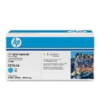
| • | HP Color LaserJet CE261A Cyan Print Cartridges achieve professional colour on business documents. Original HP cartridges with ColorSphere toner are specifically designed for your printer and avoid wasted time and supplies. |
| • | Print standout colour business documents using Original HP cartridges with ColorSphere toner. Get print shop-quality results in the office – HP toner is compatible with a wide range of laser papers and delivers consistent results. | | • | Keep printing costs low while maintaining productivity. HP Color LaserJet print cartridges deliver consistent, uninterrupted printing. Because cartridges are designed for exceptional reliability, you avoid wasted supplies and expensive delays. | | • | Easily track toner usage and reorder, thanks to intelligence built into Original HP cartridges. Enjoy easy recycling - cartridges returned via HP Planet Partners are recycled responsibly1. | | • | 1Program availability varies. HP printing supplies return and recycling is currently available in more than 49 countries, territories and regions in Asia, Europe, and North and South America through the HP Planet Partners program. For more information visit www.hp.com/recycle. | 
| overview & specifications |
| Overview and features | Overview
| HP Color LaserJet CE261A Cyan Print Cartridges achieve professional colour on business documents. Original HP cartridges with ColorSphere toner are specifically designed for your printer and avoid wasted time and supplies.
| | Printing specifications | Colour(s) of Print Cartridges
| Cyan
| Print technology
| Laser
| Page yield (colour)
| Average cartridge yields 11,000 standard pages. Declared yield value in accordance with ISO/IEC 19798*
| Page Yield Footnote
| *Actual yields vary considerably based on images printed and other factors.
| | Environmental specifications | Operating Humidity Range
| 20 to 80% RH
| Storage temperature range (Celsius)
| -20 to 40° C
| | Dimensions/weight/warranty | Package dimensions (W x D x H)
| 390 x 164 x 214 mm
| Package weight
| 1.84 kg
| Warranty
| This HP product is warranted to be free from defects in materials and workmanship. |
|
|
 |
|


 (c) 2026 mdex.my All rights reserved