4 LOGIN
8 HOME 7 CONTACT MDEX 6 HELP 5
3 CART
About us
Terms & Conditions
JOIN US PRODUCTS COMMUNITY MY TRADE MARKETPLACE ABOUT MDEX
Baby Care
  Contact Supplier
 
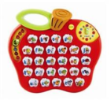
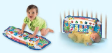
Home 21 - Development toys VTECH Alphabet Apple
 
VTECH Alphabet Apple


List Price : RM119.90
Product Code : Alphabet Apple
Product Category : Baby Gear
Brand/Model : VTECH
Unit of Measurements : 1 Unit
Minimum Order Quantity : 1
 
 
Description :
Go on an animal safari for all your essential pre-school learning! Press the chunky, light-up alphabet buttons and turn the clock hands to discover lots of activities. Teaches phonic sounds, letters, spelling, animals and their characteristics and time concepts, with 26 cheerful melodies and lots of fun animal sound effects.
Encourages language development and independent play. Also includes a quiz for repetitive play. Features a useful carry handle so you can learn on the go!

Suitable For : 2 to 5 years old
 
MACLAREN Techno XT 2009 - Black on Black Frame
MACLAREN Techno XT 2009 - Charcoal on Silver Frame
MACLAREN Triumph 2009 - Rasberry Pink
MACLAREN Triumph 2009 - Scarlet
MACLAREN Triumph 2009 Charcoal
       
MACLAREN Twin Techno 2009
MY DEAR Stroller 01845 (Blue)
MY DEAR Stroller with Full Canopy 01881
MY DEAR Twin Stroller 01811
TAIHOYO Twin Baby Stroller H800UPJS
 
Sub Categories
Home Privacy Statement
Sign In Terms of Use Agreement
Contact
Order Cancellation Policy
Help Return / Refund Policy
Customer Service Marketplace Return Policy
Warranty
Complaint & Dispute
 
MDEX Learning Centre
Step 1 - Login to your seller account Step 6 - Add product on your MDEX account
Step 2 - Change password Step 7 - Edit product on your MDEX account
Step 3 - Create your company profile Step 8 - Delete product on your MDEX account
Step 4 - Add your company logo, letterhead and stamp Step 9 - Approve customers
Step 5 - Create product categories Step 10 - Delete customers
 
       
(c) 2026 mdex.my All rights reserved