4 LOGIN
8 HOME 7 CONTACT MDEX 6 HELP 5
3 CART
About us
Terms & Conditions
JOIN US PRODUCTS COMMUNITY MY TRADE MARKETPLACE ABOUT MDEX
Baby Care
  Contact Supplier
 
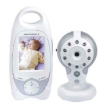
Home 06 - Baby Monitor MOTOROLA Digital Baby Monitor with LCD Screen (MBP30)
 
MOTOROLA Digital Baby Monitor with LCD Screen (MBP30)


List Price : RM799.00
Product Code : Baby Monitor
Product Category : Baby Gear
Brand/Model : MOTOROLA
Unit of Measurements : 1 Unit
Minimum Order Quantity : 1
 
 
Description :

The Motorola Digital Baby Monitor is the best way to monitor your baby

Product Features :

- Digital Video Baby Monitor with 2.4" LCD Color Screen allows the parents to hear and see the baby everywhere in your house

- Night vision with adjustable brightness enable you to see baby in the dark

- Extra long range coverage up to 150M so you can monitor your baby everywhere in the house

- 2-way communication allows you to talk to your baby when she wakes up

- High sensitivity - hear every move and noise from your baby

- Belt clip : Easy to carry all around the house

- Sound-level indicators : let you know if your baby make noise or cry

- Temperature monitor to ensure the room optimum temperature for your little one

- 5 lullabies to sooth your baby to sleep

- Starry night light to make funs and calming your baby

- Out of range warning

- Out of battery indicator

 
VIVA Playpen - Doggy
VIVA Playpen with Latex Matress (Doggy)
Cot Bed 4 in 1 BL828
Baby Cot SDB884
Baby Cot SDB884
Baby Cot BL818
Baby Cot BL818
       
Baby Cot Diona
Baby Cot Diona
Baby Cot 811
Baby Cot 811
Baby Cot 823 with Drawer
Baby Cot SDB884 with Latex Matress Package
Baby Cot 823-D with Latex Matress Package
 
Sub Categories
Home Privacy Statement
Sign In Terms of Use Agreement
Contact
Order Cancellation Policy
Help Return / Refund Policy
Customer Service Marketplace Return Policy
Warranty
Complaint & Dispute
 
MDEX Learning Centre
Step 1 - Login to your seller account Step 6 - Add product on your MDEX account
Step 2 - Change password Step 7 - Edit product on your MDEX account
Step 3 - Create your company profile Step 8 - Delete product on your MDEX account
Step 4 - Add your company logo, letterhead and stamp Step 9 - Approve customers
Step 5 - Create product categories Step 10 - Delete customers
 
       
(c) 2026 mdex.my All rights reserved