4 LOGIN
8 HOME 7 CONTACT MDEX 6 HELP 5
3 CART
About us
Terms & Conditions
JOIN US PRODUCTS COMMUNITY MY TRADE MARKETPLACE ABOUT MDEX
Baby Care
  Contact Supplier
 
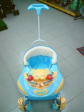
Home 13 - Bicycle Control Cars Sweet Heart Walker 6219H
 
Sweet Heart Walker 6219H


List Price : RM179.00
Product Code : 6219H
Product Category : Baby Gear
Brand/Model : Sweet Heart
Unit of Measurements : 1 Unit
Minimum Order Quantity : 1
 
 
Description :

Product Features :

- 2 IN 1 Function, can be walker or convert to rocker easily

- Attractive sound, light and toy tray can entertain baby's sense of sight, hearing and touch and wide base for stability

- Recommended Age : From 6 months onwards

** This is an oversided item. The product weight calculations is based on volumetric weight.


MAM Learn To Brush Set
The First Years Toothbrush 2 pcs
The First Years Fingertip Toothbrush
Pigeon Baby Training Toothbrush 12 Months Lesson 3 Lime Green
Pigeon Baby Training Toothbrush 12 Months Lesson 3 Pink
       
Pigeon Baby Training Toothbrush 12 Months Lesson 3 Blue
Pigeon Baby Training Toothbrush 8-12 Months Lesson 2 Pink
Pigeon Baby Training Toothbrush 8-12 Months Lesson 2 Blue
Pigeon Baby Training Toothbrush 6-8 Months Lesson 1 Light Blue
Pigeon Baby Training Toothbrush 6-8 Months Lesson 1 Light Pink
 
Sub Categories
Home Privacy Statement
Sign In Terms of Use Agreement
Contact
Order Cancellation Policy
Help Return / Refund Policy
Customer Service Marketplace Return Policy
Warranty
Complaint & Dispute
 
MDEX Learning Centre
Step 1 - Login to your seller account Step 6 - Add product on your MDEX account
Step 2 - Change password Step 7 - Edit product on your MDEX account
Step 3 - Create your company profile Step 8 - Delete product on your MDEX account
Step 4 - Add your company logo, letterhead and stamp Step 9 - Approve customers
Step 5 - Create product categories Step 10 - Delete customers
 
       
(c) 2026 mdex.my All rights reserved