4 LOGIN
8 HOME 7 CONTACT MDEX 6 HELP 5
3 CART
About us
Terms & Conditions
JOIN US PRODUCTS COMMUNITY MY TRADE MARKETPLACE ABOUT MDEX
Baby Care
  Contact Supplier
 
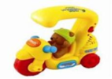
Home 21 - Development toys VTECH Push & Learn Scooter
 
VTECH Push & Learn Scooter


List Price : RM59.90
Product Code : Push & Learn Scooter
Product Category : Baby Gear
Brand/Model : VTECH
Unit of Measurements : 1 Unit
Minimum Order Quantity : 1
 
 
Description :

Let's go for a ride with the Push and Sing Tricycle. Watch the friendly bear character wobble from side to side as baby pushes him around and around. Press the fun music button to learn basic colours and weather concepts. Push the tricycle to hear fun phrases, songs, melodies and see flashing lights which will encourage your baby to continue playing with the cute character.

Listen to the melodies getting faster as baby pushes the tricycle harder.

Recommended Age: 6 months and up
 
SIMPLE DIMPLE Shield Diaper Bag Back Pack Large Black
SIMPLE DIMPLE Shield Diaper Bag Back Pack Large Grey
SIMPLE DIMPLE Diaper Back Pack With Motives White
SIMPLE DIMPLE Shiled Diaper Bag Back Pack With Motives Grey
SMPLE DIMPLE Diaper Bag Stylish Back Pack Bear & Bunny
       
SIMPLE DIMPLE Diaper Bag Stylish Back Pack
SIMPLE DIMPLE Diaper Bag Stylish Sling Bag
SIMPLE DIMPLE Summer Bear Diaper Back Pack
SIMPLE DIMPLE Simply Magical Bag
AVENT 2 Magic Cup Handles
 
Sub Categories
Home Privacy Statement
Sign In Terms of Use Agreement
Contact
Order Cancellation Policy
Help Return / Refund Policy
Customer Service Marketplace Return Policy
Warranty
Complaint & Dispute
 
MDEX Learning Centre
Step 1 - Login to your seller account Step 6 - Add product on your MDEX account
Step 2 - Change password Step 7 - Edit product on your MDEX account
Step 3 - Create your company profile Step 8 - Delete product on your MDEX account
Step 4 - Add your company logo, letterhead and stamp Step 9 - Approve customers
Step 5 - Create product categories Step 10 - Delete customers
 
       
(c) 2026 mdex.my All rights reserved