4 LOGIN
8 HOME 7 CONTACT MDEX 6 HELP 5
3 CART
About us
Terms & Conditions
JOIN US PRODUCTS COMMUNITY MY TRADE MARKETPLACE ABOUT MDEX
Imagetech Marketing Sdn Bhd
  Contact Supplier
 
Home Printer Ink Catridges HP (Hewlett Packard) CD974AA - HP Inkjet Cartridge CD974AA (920XL) Yellow
 
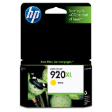
CD974AA - HP Inkjet Cartridge CD974AA (920XL) Yellow


List Price : RM47.00
Product Code : CD974AA
Product Category : Printer Consumables
Brand/Model : Hewlett packard
Unit of Measurements : 1/unit
Minimum Order Quantity : 1
   
 
Description :
Print professional color documents for up to 40% less than laser, using HP Officejet inks.
Print fast-drying documents with vivid color, using papers with the ColorLok logo.
HP proprietary inks prevent corrosion and clogging of the printhead—ensuring the best prints.

Overview & Specifications

Overview and features
 
  • Yellow

Printing specifications
Colour(s) of print cartridges
Yellow
Page yield (colour)
700 pages
 
0615B003AA - Canon PG-40 Ink Cartridge Black
0617B003AA - Canon CL-41 Ink Cartridge Black
0616B003AA - Canon PG-50 Ink Cartridge Black
0618B003AA - Canon CL-51 Ink Cartridge Colour
0619B003AA - Canon CL-52 Photo Cartridge Colour
       
2102B001AA - Canon PG-830 Ink Cartridge Black
2103B001AA - Canon CL-831 Ink Cartridge Colour
0628B003AA - Canon PGI-5Bk Ink Cartridge Black
0620B003AA - Canon CLI-8Bk Ink Cartridge Black
0621B003AA - Canon CLI-8C Ink Cartridge Cyan
 
Sub Categories
Home Privacy Statement
Sign In Terms of Use Agreement
Contact
Order Cancellation Policy
Help Return / Refund Policy
Customer Service Marketplace Return Policy
Warranty
Complaint & Dispute
 
MDEX Learning Centre
Step 1 - Login to your seller account Step 6 - Add product on your MDEX account
Step 2 - Change password Step 7 - Edit product on your MDEX account
Step 3 - Create your company profile Step 8 - Delete product on your MDEX account
Step 4 - Add your company logo, letterhead and stamp Step 9 - Approve customers
Step 5 - Create product categories Step 10 - Delete customers
 
       
(c) 2026 mdex.my All rights reserved