4 LOGIN
8 HOME 7 CONTACT MDEX 6 HELP 5
3 CART
About us
Terms & Conditions
JOIN US PRODUCTS COMMUNITY MY TRADE MARKETPLACE ABOUT MDEX
Imagetech Marketing Sdn Bhd
  Contact Supplier
 
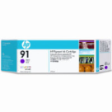
Home Printer Ink Catridges HP (Hewlett Packard) C9468A - HP Inkjet Cartridge C9468A (91) Magenta 775ml
 
C9468A - HP Inkjet Cartridge C9468A (91) Magenta 775ml


List Price : RM768.00
Product Code : C9468A
Product Category : Printer Consumables
Brand/Model : Hewlett-Packard
Unit of Measurements : 1/Unit
Minimum Order Quantity : 1
   
 
Description :
Product Description
Genuine Hewlett Packard HP C9468A ( HP 91 ) magenta inkjet cartridge (775 ml of ink) designed for the Hewlett Packard HP DesignJet Z6100 inkjet printers.
 
C9468A Specifications table

ColorMagenta
ManufacturerHP
TypeOEM
Part No.C9468A
CategoryInkJet Cartridges
OEM compatibilityHP
Capacity775 ml ink
Weight2.350
Dimentions13.000 x 5.000 x 2.500
 
 
0628B003AA - Canon PGI-5Bk Ink Cartridge Black
0620B003AA - Canon CLI-8Bk Ink Cartridge Black
0621B003AA - Canon CLI-8C Ink Cartridge Cyan
0622B003AA - Canon CLI-8M Ink Cartridge Magenta
0623B003AA - Canon CLI-8C Ink Cartridge Yellow
       
0624B003AA - Canon CLI-8 PC Ink Cartridge Photo Cyan
0658B003AA - Canon CLI-8 PM Ink Cartridge Photo Magenta
0626B003AA - Canon CLI-8 R Ink Cartridge Red
0627B003AA - Canon CLI-8 G Ink Cartridge Green
4705A004AC - Canon BCI-6BK Ink Cartridge Black
 
Sub Categories
Home Privacy Statement
Sign In Terms of Use Agreement
Contact
Order Cancellation Policy
Help Return / Refund Policy
Customer Service Marketplace Return Policy
Warranty
Complaint & Dispute
 
MDEX Learning Centre
Step 1 - Login to your seller account Step 6 - Add product on your MDEX account
Step 2 - Change password Step 7 - Edit product on your MDEX account
Step 3 - Create your company profile Step 8 - Delete product on your MDEX account
Step 4 - Add your company logo, letterhead and stamp Step 9 - Approve customers
Step 5 - Create product categories Step 10 - Delete customers
 
       
(c) 2026 mdex.my All rights reserved