4 LOGIN
8 HOME 7 CONTACT MDEX 6 HELP 5
3 CART
About us
Terms & Conditions
JOIN US PRODUCTS COMMUNITY MY TRADE MARKETPLACE ABOUT MDEX
Sentrix Technology Sdn Bhd
  Contact Supplier
 
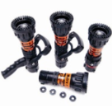
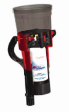
Home Fire Fighting Equipments TFT - Fixed Gallonage Nozzles

 
TFT - Fixed Gallonage Nozzles

List Price : Contact Seller
Product Code : Metro
Product Category : Constructions
Brand/Model : TFT
Unit of Measurements : unit
Minimum Order Quantity : 2
 
 
Description :
Metro 1 and Metro 2 Fixed Gallonage Nozzles
If you are looking for the simplicity of a fixed gallonage nozzle combined with the fiexibility of multiple flow and pressure choices, then look no further than the Task Force Tips Metro 1 and Metro 2 series - compact and rugged nozzles that can be customized to fit many applications.
• Designed for 1-½”, 1-¾”, 2”, or 2-½” attack lines
• Unique, interchangeable disc system provides mutiple flow and pressure choices up to 250 gpm/50 psi
• Available in tip-only configurations for break-and -extend operations, with built-in shutoff, or with the optional color-coded pistol grip
• Exclusive full-filled “power fog” pattern
• Low-and multi-expansion foa attachments available
• NFPA #1964 standard compliant
• Exclusive “gasket grabber” to prevent pattern-disrupting debris
 
Glove - X3
Glove - X3
High Sensitivity Detection System VLF-250
Fire Hose Box
Fire Hose Box
Fire Extinguisher Box
Manual Torque Multiplier
       
Electric and Pneumatic Nutrunner
Hydraulic Power Tools / Power Wrenches
Universal Hydraulic Socket Tool
TFT - QuadraFog and ThunderFog Nozzles
TFT - Mid-Force Nozzle
 
Sub Categories
Home Privacy Statement
Sign In Terms of Use Agreement
Contact
Order Cancellation Policy
Help Return / Refund Policy
Customer Service Marketplace Return Policy
Warranty
Complaint & Dispute
 
MDEX Learning Centre
Step 1 - Login to your seller account Step 6 - Add product on your MDEX account
Step 2 - Change password Step 7 - Edit product on your MDEX account
Step 3 - Create your company profile Step 8 - Delete product on your MDEX account
Step 4 - Add your company logo, letterhead and stamp Step 9 - Approve customers
Step 5 - Create product categories Step 10 - Delete customers
 
       
(c) 2026 mdex.my All rights reserved