4 LOGIN
8 HOME 7 CONTACT MDEX 6 HELP 5
3 CART
About us
Terms & Conditions
JOIN US PRODUCTS COMMUNITY MY TRADE MARKETPLACE ABOUT MDEX
Lorex Sdn Bhd
  Contact Supplier
 
Home LOREX Accessory Cables and Housings Accessory Cables and Housings - VQ2120 - Night Vision Accessory
 
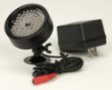
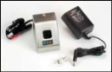
Accessory Cables and Housings - VQ2120 - Night Vision Accessory


List Price : Contact Seller
Product Code : VQ2120
Product Category : Accessories & Parts
Unit of Measurements : 1
Minimum Order Quantity : 1
 
 
Description :
Description:

Features:
  • Allows B&W cameras to see in total darkness for up to 35 to 40 feet distance
  • Compatible with most B&W cameras
  • 68 CDS illumination sensors
  • Automatically activates in low-light conditions
  • Weatherproof housing
  • Illuminator angle of 50 to 60 degrees
 
SXR1140-A - 40 GB Single Channel DVR with Audio
VG1000 - Digital Video Security System
VG1100 - Digital Video Security System with Color Camera
SY600 - Simulated (Dummy) Security Camera
SY2715WQ - 2.4 GHz Wired + Wireless Color Quad System
       
SY1009 - B&W Weatherproof Video Security Camera
SY1022 - Weatherproof Color Video Security Camera
Accessory Outdoor Sunshade Housing - ACC1600
Accessory Cables and Housings - SG7090X - Auto Pan
Accessory Cables and Housings - CVA6806 - High Performance 100ft. Cable with (6 PIN) Coupler
 
Sub Categories
Home Privacy Statement
Sign In Terms of Use Agreement
Contact
Order Cancellation Policy
Help Return / Refund Policy
Customer Service Marketplace Return Policy
Warranty
Complaint & Dispute
 
MDEX Learning Centre
Step 1 - Login to your seller account Step 6 - Add product on your MDEX account
Step 2 - Change password Step 7 - Edit product on your MDEX account
Step 3 - Create your company profile Step 8 - Delete product on your MDEX account
Step 4 - Add your company logo, letterhead and stamp Step 9 - Approve customers
Step 5 - Create product categories Step 10 - Delete customers
 
       
(c) 2026 mdex.my All rights reserved