4 LOGIN
8 HOME 7 CONTACT MDEX 6 HELP 5
3 CART
About us
Terms & Conditions
JOIN US PRODUCTS COMMUNITY MY TRADE MARKETPLACE ABOUT MDEX
Mr Marks Tools (M) Sdn Bhd
  Contact Supplier
 
Home Mr. Mark Tools Collection Screwdrivers & Bits Mr Mark Stubby Screwdriver
 
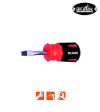
Mr Mark Stubby Screwdriver


List Price : RM11.40
Product Code : MM-MK-800-M6
Product Category : Tools
Brand/Model : Mr Mark Tools
Unit of Measurements : Piece
Minimum Order Quantity : 1
 
 
Description :
Mr Mark Stubby Screwdriver
• Blade high alloy chromvanadium steel.
• Satin chrome-plated.
• Black tip magnetic tip.
• USA PAT NO. 737945.
• Ergonomic grip.

Product code

Blade Length

Ø

Tip

(mm)

(inch)

MM-MK-800-M6A

38

1-1/2"

6

12 (+)

MM-MK-800-M6B

38

1-1/2"

6

12 (-)

 
MM-MK-W-12320-24 - Mr. Mark P24 'MASTER' Fiber Disc (Aluminium)
MM-MK-W-12320-36 - Mr. Mark P36
MM-MK-W-12320-36 - Mr. Mark P36 "MASTER" Fiber Disc (Aluminium)
MM-MK-W-12320-60 - Mr. Mark P60 'MASTER' Fiber Disc (Aluminium)
MM-MK-W-12320-80 - Mr. Mark P80
MM-MK-W-12320-80 - Mr. Mark P80 "MASTER" Fiber Disc (Aluminium)
MM-MK-W-12320-120 - Mr. Mark P120
MM-MK-W-12320-120 - Mr. Mark P120 "MASTER" Fiber Disc (Aluminium)
       
P24
P24 "MASTER" Fiber Disc (Silicon Carbon) (MK-W-12300-24) - by Mr. Mark Tools
P36
P36 "MASTER" Fiber Disc (Silicon Carbon) (MK-W-12300-36) - by Mr. Mark Tools
P60
P60 "MASTER" Fiber Disc (Silicon Carbon) (MK-W-12300-60) - by Mr. Mark Tools
P80
P80 "MASTER" Fiber Disc (Silicon Carbon) (MK-W-12300-80) - by Mr. Mark Tools
P120
P120 "MASTER" Fiber Disc (Silicon Carbon) (MK-W-12300-120) - by Mr. Mark Tools
 
Sub Categories
Home Privacy Statement
Sign In Terms of Use Agreement
Contact
Order Cancellation Policy
Help Return / Refund Policy
Customer Service Marketplace Return Policy
Warranty
Complaint & Dispute
 
MDEX Learning Centre
Step 1 - Login to your seller account Step 6 - Add product on your MDEX account
Step 2 - Change password Step 7 - Edit product on your MDEX account
Step 3 - Create your company profile Step 8 - Delete product on your MDEX account
Step 4 - Add your company logo, letterhead and stamp Step 9 - Approve customers
Step 5 - Create product categories Step 10 - Delete customers
 
       
(c) 2025 mdex.my All rights reserved