4 LOGIN
8 HOME 7 CONTACT MDEX 6 HELP 5
3 CART
About us
Terms & Conditions
JOIN US PRODUCTS COMMUNITY MY TRADE MARKETPLACE ABOUT MDEX
Gii Technology Sdn Bhd
  Contact Supplier
 
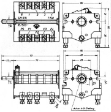
Home Connector & Switch EGO Switch ( 43.24216.000 )
 
EGO Switch ( 43.24216.000 )


List Price : Contact Seller
List Price (Include GST) : RM0.00
Product Code : 43.24216.000
Product Category : Others
Brand/Model : EGO
Unit of Measurements : 1
Minimum Order Quantity : 1
 
 
Description :

Note : Pre-order item


Part No : 43.24216.000


Specifications :-

Type

4 switching positions

Switching sequence

0-1-2-3

Switching capacity

16 A

Shaft diameter

ø 6 x 4.6 mm

Shaft length

23 mm

Connection

Screw

Material

Ceramic


Remarks :


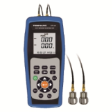
  • The above picture is for illustration only
  • All the above descriptions are subject to change without prior notice
  • Warranty : No
  • Goods sold are not refundable, returnable or exchangeable
  • Subject to minimum order quantities


Contact us @

Tel : +6012 728 1063    

Email : enquiry@giitechnology.com

 
EGO Thermostat ( 55.32532.820 )
EGO Thermostat ( 55.32559.805 )
EGO Thermostat ( 55.32542.858 )
EGO Thermostat ( 55.34052.010 )
EGO Switch ( 49.21015.724 )
       
EGO Switch ( 49.21015.600 )
Rice Cooker Heating Element
EGO Thermostat ( 55.13032.390 )
EGO HotPlate ( 11.33454.248 )
EGO Safety Thermostat ( 55.13512.090 )
 
Sub Categories
Home Privacy Statement
Sign In Terms of Use Agreement
Contact
Order Cancellation Policy
Help Return / Refund Policy
Customer Service Marketplace Return Policy
Warranty
Complaint & Dispute
 
MDEX Learning Centre
Step 1 - Login to your seller account Step 6 - Add product on your MDEX account
Step 2 - Change password Step 7 - Edit product on your MDEX account
Step 3 - Create your company profile Step 8 - Delete product on your MDEX account
Step 4 - Add your company logo, letterhead and stamp Step 9 - Approve customers
Step 5 - Create product categories Step 10 - Delete customers
 
       
(c) 2026 mdex.my All rights reserved