4 LOGIN
8 HOME 7 CONTACT MDEX 6 HELP 5
3 CART
About us
Terms & Conditions
JOIN US PRODUCTS COMMUNITY MY TRADE MARKETPLACE ABOUT MDEX
Mr Marks Tools (M) Sdn Bhd
  Contact Supplier
 
Home Mr. Mark Tools Collection Impact Sockets & Accessories 30 Pieces x 1" Impact Socket (MK-TOL-88400M-17)
 
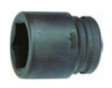
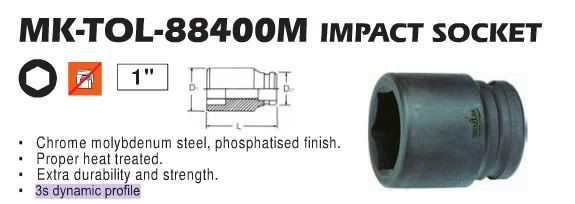
30 Pieces x 1" Impact Socket (MK-TOL-88400M-17)


Our Price : RM65.20
List Price : RM72.50
Product Code : MK-TOL-88400M-17
Product Category : DIY
Brand/Model : Mr. Mark
Unit of Measurements : 27mm(D1) x 39mm(D2) x 51(L)
Minimum Order Quantity : 30
   
 
Description :


Socket Size: 1"

Socket Dimension: 27mm (D1) x 38mm (D2) x 51mm (L)

Nut's Size: 17mm

Weight Per Piece: 270grams

Minimum Order Quantity: 30pcs / Box

Delivery Lead Time: 10 - 14 Working Days


MM-MK-W-12320-60 - Mr. Mark P60 'MASTER' Fiber Disc (Aluminium)
MM-MK-W-12320-80 - Mr. Mark P80
MM-MK-W-12320-80 - Mr. Mark P80 "MASTER" Fiber Disc (Aluminium)
MM-MK-W-12320-120 - Mr. Mark P120
MM-MK-W-12320-120 - Mr. Mark P120 "MASTER" Fiber Disc (Aluminium)
P24
P24 "MASTER" Fiber Disc (Silicon Carbon) (MK-W-12300-24) - by Mr. Mark Tools
P36
P36 "MASTER" Fiber Disc (Silicon Carbon) (MK-W-12300-36) - by Mr. Mark Tools
       
P60
P60 "MASTER" Fiber Disc (Silicon Carbon) (MK-W-12300-60) - by Mr. Mark Tools
P80
P80 "MASTER" Fiber Disc (Silicon Carbon) (MK-W-12300-80) - by Mr. Mark Tools
P120
P120 "MASTER" Fiber Disc (Silicon Carbon) (MK-W-12300-120) - by Mr. Mark Tools
"TITAN" Turbo Diamond Cutter (MK-W-680A) - by Mr. Mark Tools
3/16
3/16" Chain Saw Filer / File (MK-W-12005-316) - by Mr. Mark Tools
 
Sub Categories
Home Privacy Statement
Sign In Terms of Use Agreement
Contact
Order Cancellation Policy
Help Return / Refund Policy
Customer Service Marketplace Return Policy
Warranty
Complaint & Dispute
 
MDEX Learning Centre
Step 1 - Login to your seller account Step 6 - Add product on your MDEX account
Step 2 - Change password Step 7 - Edit product on your MDEX account
Step 3 - Create your company profile Step 8 - Delete product on your MDEX account
Step 4 - Add your company logo, letterhead and stamp Step 9 - Approve customers
Step 5 - Create product categories Step 10 - Delete customers
 
       
(c) 2025 mdex.my All rights reserved