4 LOGIN
8 HOME 7 CONTACT MDEX 6 HELP 5
3 CART
About us
Terms & Conditions
JOIN US PRODUCTS COMMUNITY MY TRADE MARKETPLACE ABOUT MDEX
To-Day global Network Sdn Bhd
  Contact Supplier
 
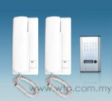
Home Alarm / Door Phone Intercom Door Bell RL 3208DD
 
Intercom Door Bell RL 3208DD


List Price : Contact Seller
Product Code : 3208DD
Product Category : Home Electronics
Brand/Model : WTO
Unit of Measurements : 1
Minimum Order Quantity : 1
 
 
Description :

Features

• The outdoor unit can call and intercommuicate with two indoor units .
• Intercommunication is available between two indoor units.
• 2-wire connection between the indoor units and outdoor unit
• Electric-controlled unlocking
• The lock is connected with the outdoor unit.
• Outdoor unit meets IP44 waterproof standard .
• Raincover is available .
• Flush mounting version.
• The aluminum alloy panel of the outdoor unit is anti-oxidation metal
• The talking voice is very clear .
• The maximum working distance is around 200m.
• Easy installation for DIY
• Enclosed One transformer 230V/9V AC or 110/9V AC

 
Door/Window Alarm With Wireless 602AR
Indoor Window Lock With Vibration Alarm 708
Motion Detector Alarm 135A
Door/Window Alarm With Wireless Remote Control 603ARK
5 in 1 Alarm (Door/Travel/Bicycle/Personal/Box) 436
       
Motion Detector With Alarm 133A
Motion Detector Alarm With External Siren 133ASK
Water Overflow Alarm 760
Dual Motion Detector With Magnetic Sensor 5200
Personal/Travel Alarm 331
 
Sub Categories
Home Privacy Statement
Sign In Terms of Use Agreement
Contact
Order Cancellation Policy
Help Return / Refund Policy
Customer Service Marketplace Return Policy
Warranty
Complaint & Dispute
 
MDEX Learning Centre
Step 1 - Login to your seller account Step 6 - Add product on your MDEX account
Step 2 - Change password Step 7 - Edit product on your MDEX account
Step 3 - Create your company profile Step 8 - Delete product on your MDEX account
Step 4 - Add your company logo, letterhead and stamp Step 9 - Approve customers
Step 5 - Create product categories Step 10 - Delete customers
 
       
(c) 2026 mdex.my All rights reserved