4 LOGIN
8 HOME 7 CONTACT MDEX 6 HELP 5
3 CART
About us
Terms & Conditions
JOIN US PRODUCTS COMMUNITY MY TRADE MARKETPLACE ABOUT MDEX
To-Day global Network Sdn Bhd
  Contact Supplier
 
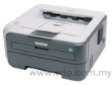
Home Telecommunications Fax Machine/Printer/ Scanner Brother Compact Mono Laser Printer for Home User HL-2140
 
Brother Compact Mono Laser Printer for Home User HL-2140


List Price : Contact Seller
Product Code : HL-2140
Product Category : Home Electronics
Brand/Model : Panasonic
Unit of Measurements : 1
Minimum Order Quantity : 1
 
 
Description :

Designed to meet the needs of every home consumers, the HL-2140 is an affordable, personal monochrome laser printer that is compact enough to fit into any home with a minimum of space required. Compatible with Macintosh and Microsoft operating systems, the printer can be connected to USB ports to facilitate connection to desktop and laptop.
Features

• Up to 22ppm mono print speed
• HQ1200 (2,400 x 600dpi) print resolution
• Full-Speed USB 2.0 connectivity
• 250-sheet input tray
• Separate toner and drum

 
Modular Cord Coupler JY-8202
Modular Jack Assembly With Dusk Cover UN71
Modular Line Cord Plug To Plug PP
Modular Plug to Dual Jack Extension Cord UN58
Modular Plug to Jack Extension Cord UN56
       
Modular Plug to Plug Extension Cord UN53
Modular Plug to Plug Extension Cord JY-8198
Modular Plug to Plug Extension Cord JY-8199
Modular Privacy Adapter UN68
Modular Single Jack Extension Cord PJ-219
 
Sub Categories
Home Privacy Statement
Sign In Terms of Use Agreement
Contact
Order Cancellation Policy
Help Return / Refund Policy
Customer Service Marketplace Return Policy
Warranty
Complaint & Dispute
 
MDEX Learning Centre
Step 1 - Login to your seller account Step 6 - Add product on your MDEX account
Step 2 - Change password Step 7 - Edit product on your MDEX account
Step 3 - Create your company profile Step 8 - Delete product on your MDEX account
Step 4 - Add your company logo, letterhead and stamp Step 9 - Approve customers
Step 5 - Create product categories Step 10 - Delete customers
 
       
(c) 2026 mdex.my All rights reserved