4 LOGIN
8 HOME 7 CONTACT MDEX 6 HELP 5
3 CART
About us
Terms & Conditions
JOIN US PRODUCTS COMMUNITY MY TRADE MARKETPLACE ABOUT MDEX
To-Day global Network Sdn Bhd
  Contact Supplier
 
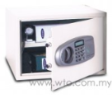
Home Office Automation Safe Box Takawachi Digital Safety Box SFT-40EC
 
Takawachi Digital Safety Box SFT-40EC


List Price : Contact Seller
Product Code : SFT-40EC
Product Category : Home Electronics
Brand/Model : Panasonic
Unit of Measurements : 1
Minimum Order Quantity : 1
 
 
Description :
Features?
• With electronic lock which is simple to operate and can be programmed with any
   combination of 3 to 8 personal numbers.
• Digital keypad with LCD display.
• Rubber pad for easy set up.
• 4 incorrect entry alarming.
• Using 4 x AA size (1.5V) batteries.
• Low battery warning.
• With manual override key system, 2 keys supplied.
• Pre-drilled holes with fixing bolts.
• Powder coated interior and exterior, various colors for option.
• Master code for option.
• LCD with blue backlit for option.

Specifications :
• External (HxWxD mm):300*438*400
• Internal (HxWxD mm):290*428*350
 
Craft Telephone Set Series T5027CL
Craft Telephone Set Series T5039CL
Craft Telephone Set Series T620A
Craft Telephone Set Series T616A
Craft Telephone Set Series T613A
       
Craft Telephone Set Series T608A
Craft Telephone Set Series T5039A
Craft Telephone Set Series T5051A
Craft Telephone Set Series T979A
Craft Telephone Set Series T923A
 
Sub Categories
Home Privacy Statement
Sign In Terms of Use Agreement
Contact
Order Cancellation Policy
Help Return / Refund Policy
Customer Service Marketplace Return Policy
Warranty
Complaint & Dispute
 
MDEX Learning Centre
Step 1 - Login to your seller account Step 6 - Add product on your MDEX account
Step 2 - Change password Step 7 - Edit product on your MDEX account
Step 3 - Create your company profile Step 8 - Delete product on your MDEX account
Step 4 - Add your company logo, letterhead and stamp Step 9 - Approve customers
Step 5 - Create product categories Step 10 - Delete customers
 
       
(c) 2026 mdex.my All rights reserved