4 LOGIN
8 HOME 7 CONTACT MDEX 6 HELP 5
3 CART
About us
Terms & Conditions
JOIN US PRODUCTS COMMUNITY MY TRADE MARKETPLACE ABOUT MDEX
To-Day global Network Sdn Bhd

  Contact Supplier
 
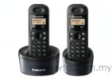
Home Panasonic Office Automation Cordless Phone Panasonic Twin Dect Phone With 4 Colours KX-TG1312ML
 
Panasonic Twin Dect Phone With 4 Colours KX-TG1312ML


List Price : Contact Seller
Product Code : KX-TG1312ML
Product Category : Telephones & Facsimile
Brand/Model : Panasonic
Unit of Measurements : 1
Minimum Order Quantity : 1
 
 
Description :
 
Features

• 10-redial memory (number only)
• One touch dial up to 9 numbers
• Call restriction
• Navigator key for easy operating
• 14 ringer melodies/6 ringer tones on handset
• Intercom (handset to handset)
• Any key answer
• Key lock
• Clock/alarm setting
• Multiple language display
• Handset locator
• 6-step ringer volume
• 3-step ear receiver volume
• 4-step battery display
• 7-hour charge time
• Wall mountable (base unit and charger)
• Colour : White, Red, Black
 
Panasonic OPC Drum KX-FAD89E
Panasonic Toner KX-FAT92E
Panasonic Drum KX-FAD93E
Door Access System
Door Access System
Name Card Cutter
Name Card Cutter
       
Time Recorder Comet AT-70
Excellent Time Recorder MT-6200
Comix Time Recorder MT-6200
Punch Card
Punch Card
25 Pocket Expanding Punch Card Rack
 
Sub Categories
Home Privacy Statement
Sign In Terms of Use Agreement
Contact
Order Cancellation Policy
Help Return / Refund Policy
Customer Service Marketplace Return Policy
Warranty
Complaint & Dispute
 
MDEX Learning Centre
Step 1 - Login to your seller account Step 6 - Add product on your MDEX account
Step 2 - Change password Step 7 - Edit product on your MDEX account
Step 3 - Create your company profile Step 8 - Delete product on your MDEX account
Step 4 - Add your company logo, letterhead and stamp Step 9 - Approve customers
Step 5 - Create product categories Step 10 - Delete customers
 
       
(c) 2026 mdex.my All rights reserved