4 LOGIN
8 HOME 7 CONTACT MDEX 6 HELP 5
3 CART
About us
Terms & Conditions
JOIN US PRODUCTS COMMUNITY MY TRADE MARKETPLACE ABOUT MDEX
Baby Care
  Contact Supplier
 
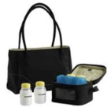
Home 10 - Breast Feeding MEDELA Citystyle Breastpump Bag
 
MEDELA Citystyle Breastpump Bag


List Price : RM269.00
Product Code : Breastpump Bag
Product Category : Feeding
Brand/Model : MEDELA
Unit of Measurements : 1 UNit
Minimum Order Quantity : 1
 
 
Description :
CityStyle Breastpump Bag

A stylish and attractive bag to transport a Medela breastpump and expressed breastmilk.
- To cool, store and transport breastmilk
- Designed for active and working mothers
- Can be used long after mother's done pumping
- Offers additional room for the breastpumps Swing, Harmony, Mini Electric Plus, Mini Electric or Manual Breastpump

This Breastpump Bag includes the following products:
- Medela Cooler Kit
- 4 BPA Free Storage Bottles
- One trendy bag
- Cooling Element
 
QUINNY Buzz 4 Stroller 2010
QUINNY Buzz 4 Stroller 2010 & Maxi Cosi : Cabrio ( Travel System )
HAUCK Turbo Stroller - Lilac
SUMMER Infant Quick Smart Easy Fold Stroller With Weathershield
QUINNY Buzz 3 Stroller 2010 - Rebel Red
       
QUINNY Buzz 3 Stroller 2010 - Roller Pink
QUINNY Buzz 3 Stroller 2010 - Rocking Black
QUINNY Buzz Stroller Special Edition (Black)
QUINNY Buzz Stroller Special Edition (White)
QUINNY Buzz 3 & Maxi Cosi : Cabrio ( Travel System )
 
Sub Categories
Home Privacy Statement
Sign In Terms of Use Agreement
Contact
Order Cancellation Policy
Help Return / Refund Policy
Customer Service Marketplace Return Policy
Warranty
Complaint & Dispute
 
MDEX Learning Centre
Step 1 - Login to your seller account Step 6 - Add product on your MDEX account
Step 2 - Change password Step 7 - Edit product on your MDEX account
Step 3 - Create your company profile Step 8 - Delete product on your MDEX account
Step 4 - Add your company logo, letterhead and stamp Step 9 - Approve customers
Step 5 - Create product categories Step 10 - Delete customers
 
       
(c) 2026 mdex.my All rights reserved