4 LOGIN
8 HOME 7 CONTACT MDEX 6 HELP 5
3 CART
About us
Terms & Conditions
JOIN US PRODUCTS COMMUNITY MY TRADE MARKETPLACE ABOUT MDEX
Baby Care
  Contact Supplier
 
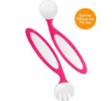
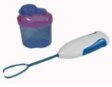
Home 11 - Solid Feeding BOON Benders Adaptable Utensils - Pink
 
BOON Benders Adaptable Utensils - Pink


List Price : RM33.90
Product Code : Adaptable Utensils
Product Category : Feeding
Brand/Model : BOON
Unit of Measurements : 1 Unit
Minimum Order Quantity : 1
 
 
Description :

When first-time eaters start using utensils, their motor skills are not fully developed. Benders adaptable utensils were designed to help make the transition to regular utensils a little easier. Parents can position the adjustable end to the perfect angle to accommodate the child’s grip. As motor skills develop, adjust little by little, until straightened.

- Can be adjusted to child’s motor skill development

- Helps children transition to regular utensils

- Adapts to developing grip—use a sharper angle for early stages, straight for advanced stages

- Soft, easy-grip handles

- Dishwasher-safe

- Recommended ages: 9+ months


SAFE n SOUND Sleep Positioner (Assorted Colors)
IMON Digital Baby Monitor
IMON Wireless Baby Monitor Additonal Camera
IMON Wireless Baby Monitor
       
MOTOROLA Digital Baby Monitor with LCD Screen (MBP30)
MOTOROLA Digital Baby Monitor - 1 Way (MBP10)
PHILIPS AVENT DECT Baby Monitor SCD530
ASOGO Mobile Baby Phone
MY DEAR 2.4Hz Digital Baby Monitor
 
Sub Categories
Home Privacy Statement
Sign In Terms of Use Agreement
Contact
Order Cancellation Policy
Help Return / Refund Policy
Customer Service Marketplace Return Policy
Warranty
Complaint & Dispute
 
MDEX Learning Centre
Step 1 - Login to your seller account Step 6 - Add product on your MDEX account
Step 2 - Change password Step 7 - Edit product on your MDEX account
Step 3 - Create your company profile Step 8 - Delete product on your MDEX account
Step 4 - Add your company logo, letterhead and stamp Step 9 - Approve customers
Step 5 - Create product categories Step 10 - Delete customers
 
       
(c) 2026 mdex.my All rights reserved