4 LOGIN
8 HOME 7 CONTACT MDEX 6 HELP 5
3 CART
About us
Terms & Conditions
JOIN US PRODUCTS COMMUNITY MY TRADE MARKETPLACE ABOUT MDEX
Baby Care
  Contact Supplier
 
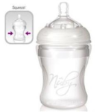
Home 04 - Bottle Feeding NUBY Natural Touch Soft Flex Silicone Nurser 210ml (BPA Free)
 
NUBY Natural Touch Soft Flex Silicone Nurser 210ml (BPA Free)


List Price : RM54.90
Product Code : Soft Flex Silicone
Product Category : Baby Gear
Brand/Model : NUBY
Unit of Measurements : 1 Unit
Minimum Order Quantity : 1
 
 
Description :
Gentle Squeeze makes all the difference ...

The SoftFlex Silicone Bottle features a revolutionary new soft air silicone base. Made from 100% BPA free silicone, the soft silicone base allows the parent to help assist with feeding by giving the bottle a gentle squeeze. This unique bottle also features anti-colic vents, and Nuby's Natural Touch breast size nipple

- Comes with medium flow natural touch nipple/teat
 
QUINNY ZAPP Stroller 2010 (Electric Blue)
QUINNY Zapp & Maxi Cosi Cabrio ( Travel System )
QUINNY Zapp Shopping Basket
QUINNY ZAPP Stroller 2009 (Storm) - Limited 1 Unit
COMBI Urban Walker Stroller UR-300Y (Brown)
       
COMBI Urban Walker Stroller UR-300Y (Navy Blue)
GELITE Synergy Baby Stroller
MACLAREN Quest Sport - Charcoal / Flame Orange
MACLAREN Quest Sport 2010 - Black / Kiwi Lime
MACLAREN Quest Sport - Charcoal / Powder Pink
 
Sub Categories
Home Privacy Statement
Sign In Terms of Use Agreement
Contact
Order Cancellation Policy
Help Return / Refund Policy
Customer Service Marketplace Return Policy
Warranty
Complaint & Dispute
 
MDEX Learning Centre
Step 1 - Login to your seller account Step 6 - Add product on your MDEX account
Step 2 - Change password Step 7 - Edit product on your MDEX account
Step 3 - Create your company profile Step 8 - Delete product on your MDEX account
Step 4 - Add your company logo, letterhead and stamp Step 9 - Approve customers
Step 5 - Create product categories Step 10 - Delete customers
 
       
(c) 2025 mdex.my All rights reserved