4 LOGIN
8 HOME 7 CONTACT MDEX 6 HELP 5
3 CART
About us
Terms & Conditions
JOIN US PRODUCTS COMMUNITY MY TRADE MARKETPLACE ABOUT MDEX
Baby Care
  Contact Supplier
 
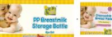
Home 04 - Bottle Feeding BUMBLE BEE BPA Free 5oz PP Breastmilk Bottle (8pcs) FREE Breast Pad
 
BUMBLE BEE BPA Free 5oz PP Breastmilk Bottle (8pcs) FREE Breast Pad


List Price : RM38.90
Product Code : Breastmilk Bottle
Product Category : Feeding
Brand/Model : BUMBLE BEE BPA
Unit of Measurements : 8pcs/pack
Minimum Order Quantity : 1
 
 
Description :
Bumle Bee PP breastmilk storage bottles are made of BPA-free polyprepylene (PP), approved by US FDA. Researches have shown that PP is the best & safest plastic for breast milk storage in retaining breastmilk's beneficial properties

PP bottles resist scratches, splintering and cracking. It can sustained heat up to 120 degrees.

These bottles are compatible with major brands breast pumps and you can express milk directly into the storage bottles.

Set includes:
- 8 x 5oz PP Breastmilk Storage Bottles
- 8 screw rings
- 8 sealing discs
- 36pcs disposable breast pad

 
MACLAREN Quest Sport Charcoal / Silver
MACLAREN Techno XLR - Coffee Brown / Soft Blue
MACLAREN Techno XLR 2009 - Black / Champagne
MACLAREN Techno XLR 2009 - Charcoal / Flame Orange
MACLAREN Techno XLR 2009 - Coffee Brown / Powder Pink
       
MACLAREN Techno XLR 2009 - Coffee Brwon / Marsh Green
MACLAREN Techno XLR 2009 - Navy Blue / Sky Blue
MACLAREN Techno XT 2009 - Black on Black Frame
MACLAREN Techno XT 2009 - Charcoal on Silver Frame
MACLAREN Triumph 2009 - Rasberry Pink
 
Sub Categories
Home Privacy Statement
Sign In Terms of Use Agreement
Contact
Order Cancellation Policy
Help Return / Refund Policy
Customer Service Marketplace Return Policy
Warranty
Complaint & Dispute
 
MDEX Learning Centre
Step 1 - Login to your seller account Step 6 - Add product on your MDEX account
Step 2 - Change password Step 7 - Edit product on your MDEX account
Step 3 - Create your company profile Step 8 - Delete product on your MDEX account
Step 4 - Add your company logo, letterhead and stamp Step 9 - Approve customers
Step 5 - Create product categories Step 10 - Delete customers
 
       
(c) 2025 mdex.my All rights reserved