4 LOGIN
8 HOME 7 CONTACT MDEX 6 HELP 5
3 CART
About us
Terms & Conditions
JOIN US PRODUCTS COMMUNITY MY TRADE MARKETPLACE ABOUT MDEX
Baby Care
  Contact Supplier
 
Home 07 - Baby Care Nursery Accessories LINDAM Baby Talk
 
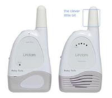
LINDAM Baby Talk


List Price : RM329.90
Product Code : Baby Talk
Product Category : Baby Gear
Brand/Model : LINDAM
Unit of Measurements : 1 Unit
Minimum Order Quantity : 1
 
 
Description :
The Lindam Baby Talk monitor has crystal clear sound with a transmission range of up to 200m. The receiver has an adjustable volume setting and a visual indication of volume control which is handy if you are in a busy or loud environment, giving reassurance against other background noises. All Lindam monitors are fitted with a comforting night light, digital clock and 2 channel frequencies to minimize the risk of interference.
- Crystal clear sound
- 200m range
- Volume control and visual sound indicator
- Comforting night light
- 24 hour digital clock
- Battery (4 x LR6/AA per unit) or Mains Operated (Adaptor included)


Warranty: 1 Year Limited Warranty
 
PHILIPS AVENT Soft Spout 6M+ (White)- 2pcs
FARLIN Fur-Preventing Silicone Nipple T-2 (2pcs)
FARLIN Glass Feeder 120ML
BUMBLE BEE BPA Free 5oz PP Breastmilk Bottle (8pcs) FREE Breast Pad
FARLIN Glass Feeder 240ml
       
FARLIN Milk Powder Container BF-180A
FARLIN Milk Powder Container BF-183
FARLIN Milk Powder Container BF-183A
FARLIN Nipple Hole Puncher
FARLIN Orthodontic Silicone Nipple L
 
Sub Categories
Home Privacy Statement
Sign In Terms of Use Agreement
Contact
Order Cancellation Policy
Help Return / Refund Policy
Customer Service Marketplace Return Policy
Warranty
Complaint & Dispute
 
MDEX Learning Centre
Step 1 - Login to your seller account Step 6 - Add product on your MDEX account
Step 2 - Change password Step 7 - Edit product on your MDEX account
Step 3 - Create your company profile Step 8 - Delete product on your MDEX account
Step 4 - Add your company logo, letterhead and stamp Step 9 - Approve customers
Step 5 - Create product categories Step 10 - Delete customers
 
       
(c) 2025 mdex.my All rights reserved